
NightOwl Companion
ResmedMedical
4.82.03K Reviews
- Version
- 4.2.0
- Installs
- 100.00K
- Age Rating
- Everyone
Screenshots
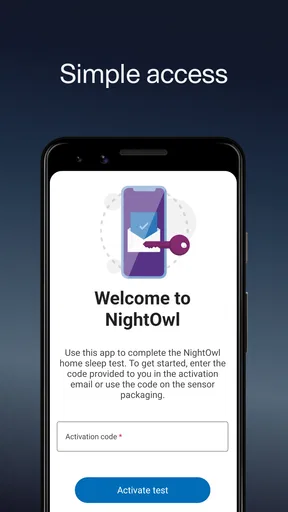
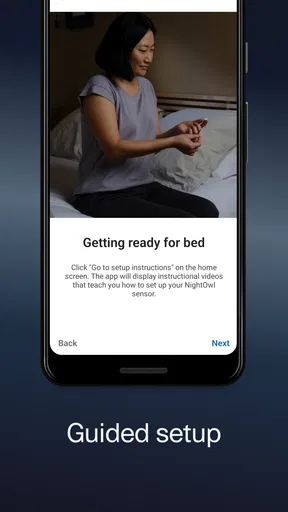
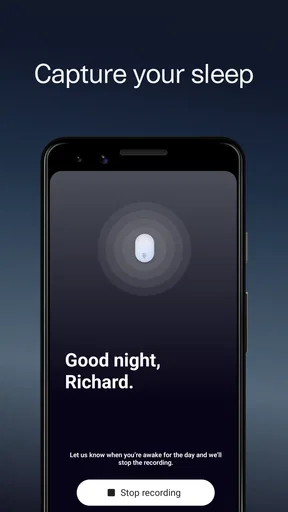
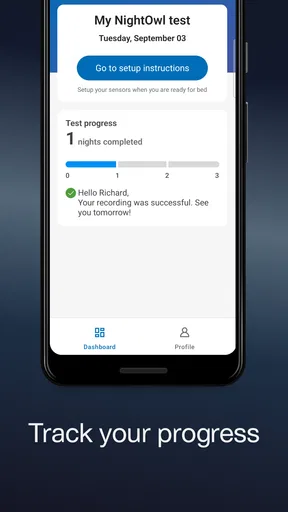
Our Review of NightOwl Companion
 Analysis by Appyee
I approached NightOwl Companion as a medical app with a fairly focused job: helping a person interact with the NightOwl sensor. That narrow purpose is important. This is not the kind of health app I would open for general fitness tracking, medication reminders, or broad sleep journaling. Its value depends on the sensor workflow, so the right question is not whether it offers the largest feature set, but whether that focused experience is understandable and manageable for the person using it.
Developed by Resmed, the app is free and available for Everyone, which makes it approachable for people who may already be dealing with the practical and emotional load of sleep-related care. It has built a strong public reception, with a 4.8 average from around 24 thousand ratings, about 2 thousand written reviews, and over 100 thousand installs. Those figures suggest that many users find the experience useful, although they do not remove the need to consider individual abilities, phone habits, and the demands of using a sensor correctly.
How clearly the app supports different users
I find that NightOwl Companion is easiest to judge when I focus on the person using it, not just the phone in their hand. This section looks at how visual, physical, and situational needs can shape the sensor routine, including when a little preparation or help makes the experience more manageable. It also sets up the practical question of which users are most likely to benefit.
Readability and navigation come first
In my experience, a companion app for a medical sensor succeeds or fails on clarity. The user should not have to guess whether the sensor is connected, whether an action has been accepted, or what to do next. With NightOwl Companion, I would treat every screen as part of a short practical routine rather than as a place to browse. That mindset helps because the app's purpose is specific: interact with the NightOwl sensor, not explore a large collection of unrelated tools.
The focused design is potentially helpful for people who find crowded health dashboards tiring. Someone who is already managing appointments, equipment, and sleep concerns may prefer an app that stays close to one task. The trade-off is that a focused companion can feel less forgiving if a user expects a full explanation of sleep health or a broad history of personal trends. I would not choose it as a replacement for a general sleep diary or a clinician's guidance.
For readability, I recommend using the phone's normal display settings first and avoiding unnecessary distractions around the setup area. A quiet room, a charged phone, and enough time to read each instruction can make a bigger difference than rushing through the process late at night. If you have reduced vision, glare sensitivity, or difficulty distinguishing small interface elements, check whether your phone's own text enlargement, contrast, or screen-reading tools make the app easier to use. The important point is to test those settings before you need the sensor, rather than during a tired bedtime routine.
I also found that the best way to judge navigation is by asking whether another person could understand the next step without a long explanation. This matters for users who rely on a partner, family member, or caregiver for occasional help. A companion should allow that helper to support the process without taking over every detail. Still, I would keep the person using the sensor involved in the routine whenever possible, especially when confirming that the sensor is ready or that an action has completed.
Motor needs and the physical routine
The app itself is only one part of the experience. Interaction with a sensor adds a physical layer that can be more demanding than tapping through ordinary health software. A person with limited dexterity, tremor, joint pain, or reduced grip strength may find the phone controls manageable while struggling with the sensor-related steps. That distinction is easy to miss when judging an app from its icon or screenshots.
My practical advice is to prepare the phone and sensor before settling into the routine. Place both where they can be reached without stretching, keep the screen at a comfortable angle, and avoid balancing the phone in one hand while handling the sensor with the other. These small changes reduce the chance of dropping something or accidentally leaving the app while trying to reposition equipment. They also make the process less stressful for anyone who has difficulty with precise movements.
A second useful approach is to separate learning from regular use. The first few interactions should happen when the user is alert, not when they are already trying to sleep. Walk through the process slowly, notice which actions require the most hand control, and decide whether a support person should be nearby. Once the routine is familiar, the nightly or scheduled interaction should require less mental and physical effort. This is a more realistic accessibility test than assuming that a simple-looking app is automatically easy for everyone.
People with limited reach or who use a phone with assistive hardware may also need to think about placement. A stand can be more useful than holding the phone, while a clean, uncluttered surface can make sensor handling safer. I would not treat these as optional comfort improvements. For some users, they determine whether the app can be used independently or only with assistance.
Sensory comfort and nighttime use
Sleep-related technology is often used at an inconvenient time: when the room is dark, the user is tired, and sensitivity to brightness or sound may be higher. Even a medically useful workflow can become frustrating if it encourages unnecessary screen time at bedtime. I prefer to complete as much preparation as possible before getting into bed, then use the app only when the sensor interaction actually requires it.
For users who are sensitive to bright displays, the phone's system-level night display or dimming options may help, provided they do not make the interface unreadable. Someone with hearing loss should not assume that an audible prompt is the only meaningful confirmation; visual confirmation is especially important in any sensor workflow. Conversely, a user with low vision may benefit from spoken assistance or enlarged text if the phone supports it. These are phone-level strategies rather than promises about a particular built-in accessibility mode, but they can change the experience considerably.
People with cognitive fatigue may benefit from a fixed sequence. I would keep the sensor, phone, and any related items in the same place, and use the app at roughly the same point in the routine. Consistency reduces the number of decisions required. It also makes it easier for a caregiver to notice where the process stopped if assistance becomes necessary.
One less obvious consideration is privacy in shared spaces. A person may be comfortable using the app at home but less comfortable handling a medical sensor or displaying health-related information around roommates, family members, or travel companions. If the phone is shared, or if another person regularly helps with the device, agree in advance about who will handle the phone and who should see the information on screen. That is not a technical feature, but it is part of whether the app feels usable in real life.
Situational access matters as much as permanent disability
Accessibility is not limited to long-term impairments. A user may have a temporary injury, poor lighting, fatigue, illness, or a hand occupied by another task. NightOwl Companion is most practical when the user can create a predictable environment around it. I would avoid treating the app as something to operate casually while walking, in a moving vehicle, or in a noisy public place. A sensor companion deserves attention, and hurried use increases the chance of misunderstanding a step.
Travel creates another layer of friction. A person may need to use the app in an unfamiliar room, with a different bedside layout, or without the usual helper. Before traveling, I would rehearse the routine at home and pack the phone and sensor together rather than assuming the workflow will be obvious under pressure. If someone depends on assistance, it is worth deciding whether a trusted helper can be available remotely or in person. The app's focused purpose does not automatically make every context equally easy.
For people with inconsistent sleep schedules, the main challenge may be remembering the routine rather than understanding the interface. A simple personal checklist beside the bed can help: phone charged, sensor nearby, lighting ready, and the app available. I would keep that checklist separate from medical interpretation. The app can support interaction with the sensor, but decisions about symptoms, treatment, or changes in care belong with an appropriate healthcare professional.
Older adults may appreciate the limited scope, especially if a family member helps with initial setup. However, I would not assume that age alone predicts ease of use. A confident smartphone user with low vision may need more support than a less experienced user with excellent dexterity and a patient helper. The best arrangement is the one that preserves independence without turning a medical routine into a test of technical skill.
Where the experience still has barriers
The biggest limitation is built into the app's role: it is tied to the NightOwl sensor. If you do not have that sensor or do not need to interact with it, there is little reason to install this particular app. A general sleep tracker, a diary, or a broader wellness app may be more suitable for someone who only wants to record bedtime, wake time, or personal observations.
I would also be cautious about expecting the app to answer every health question. A sensor companion can be useful within its intended workflow, but it should not become the sole basis for interpreting symptoms or making treatment decisions. If results seem confusing, if the routine repeatedly fails, or if the user feels unwell, the right next step is professional advice rather than repeated guessing inside the app.
Another barrier is dependence on the phone environment. Screen settings, battery condition, physical placement, and the user's familiarity with mobile controls all affect the experience. A person who cannot reliably operate a touchscreen may need help, even if the app's task is narrow. Likewise, someone who finds nighttime phone use disruptive may prefer a process that requires less screen interaction, if an appropriate alternative is available through their care arrangement.
I would also avoid promising independence to every user. The app may reduce some steps compared with paper instructions or a manual routine, but it does not remove the physical and situational demands of using a sensor. People with significant motor limitations, severe visual impairment, or memory difficulties should try the workflow with a trusted support person and decide whether that arrangement is sustainable. An app can be well focused and still not be the right tool for every body or household.
Version, device fit, and expectations
The current version is 4.2.0, and the app requires at least iOS or Android equivalent system version 9. That makes checking the phone's operating system a sensible first step before planning a sensor session. I would also keep the phone updated within the limits of the user's device and care routine, because compatibility problems are especially inconvenient when the app is needed at a particular time.
The free price lowers the cost of trying it, but free does not mean frictionless. The real investment is attention: learning the sensor workflow, keeping the phone ready, and deciding who can help if the user encounters a problem. For a person already equipped for NightOwl, that may be a reasonable exchange. For someone comparing unrelated sleep apps, the focused design may feel too narrow regardless of price.
The Everyone age rating is reassuring for households where different generations may be involved, but it should not be confused with a guarantee that every child can independently manage a medical sensor. A younger user may still need an adult to supervise the physical routine or interpret health-related concerns. The rating describes broad suitability, while the practical support needed depends on the individual.
Who I would recommend it to
I would recommend NightOwl Companion to someone who already uses the NightOwl sensor and wants a dedicated way to interact with it. It is particularly promising for users who prefer a focused medical tool over a busy wellness dashboard, and for families who want a repeatable routine that can be supported by a partner or caregiver.
I would recommend a trial run in daylight for anyone with accessibility concerns. Test the phone's text size, brightness, contrast, spoken assistance, and physical placement before relying on the app at night. Then repeat the routine when tired, because an interface that feels easy in the afternoon may feel very different when concentration is low. This two-stage check reveals practical barriers that a rating cannot show.
I would skip it if your goal is general sleep tracking, lifestyle coaching, or a broad record of daily habits. In those situations, a standard sleep diary or a more comprehensive health app may offer a better match. I would also look for another arrangement if the user cannot safely handle the sensor or phone and no reliable support person is available.
An inclusive verdict
My overall view is positive but specific. NightOwl Companion makes the most sense as a dedicated medical companion for the NightOwl sensor, not as an all-purpose sleep application. Its free availability, focused purpose, and strong 4.8 average from around 24 thousand ratings make it worth considering for the people it is designed to serve. Resmed has kept the concept clear enough that users can judge it by a practical question: can this person interact with the sensor comfortably and consistently?
The inclusive answer depends on preparation. Larger text, reduced glare, a stable phone position, a predictable sequence, and a helper when needed can make the routine more manageable. Those adjustments are especially valuable for users with low vision, limited dexterity, fatigue, hearing differences, or temporary limitations. They also help people who simply struggle with nighttime concentration.
The strongest reason to choose this app is its direct connection to one sensor workflow; the strongest reason to hesitate is that the same narrow focus leaves little value for anyone outside that workflow. I would install it for a NightOwl user, test it in a calm setting, and decide based on actual independence and comfort rather than the download count alone. Used with realistic expectations and appropriate professional guidance, it can be a practical part of a sleep-related routine without pretending to replace broader care.
Verdict
Strengths of NightOwl Companion
- Quiet hours help reduce distractions and support healthier nighttime routines.
- Simple controls make it easy to adjust settings without a steep learning curve.
- Useful for users who want more control over late-night phone habits.
- Lightweight design should have minimal impact on device storage.
- Customizable preferences can make the experience feel more personal.
Limitations of NightOwl Companion
- Some features may require permissions that privacy-conscious users dislike.
- Results depend on consistent use rather than providing an instant solution.
- Limited customization may frustrate users seeking highly advanced controls.
- Notifications or reminders could become distracting during nighttime hours.
- Compatibility and feature availability may vary between Android and iOS devices.
Other Releases by Resmed
View All
myAir™ by Resmed
Medical4.0
Similar Picks in This Category
View All
WebMD: Symptom Checker
WebMD, LLC4.1

Microphone Amplifier
DOSA Apps4.2

Anatomy Learning - 3D Anatomy
3D Medical OU4.5

Period Tracker and Calendar
SimpleInnovation4.9

GoodRx: Prescription Coupons
GoodRx4.8

CVS Health
CVS Pharmacy4.5
Frequently Asked Questions
What is NightOwl Companion and what does it do?
NightOwl Companion is designed to support users during nighttime routines, offering tools and information intended to make late-night activities more convenient. Depending on the version and device, its features may include reminders, sleep-related assistance, notifications, or companion functions connected to another service. Before downloading, check the official store description carefully because available tools can differ between Android and iOS.
Is NightOwl Companion free to download and use?
NightOwl Companion may be available as a free download, but some features could require in-app purchases, a subscription, or access to a related premium service. We recommend reviewing the pricing section in Google Play or the App Store before installation. Also check whether a free trial automatically changes into a paid subscription and learn how to cancel it through your device settings.
What permissions does NightOwl Companion require?
The permissions requested by NightOwl Companion depend on the functions enabled on your phone. A companion app may ask for notifications, Bluetooth, location, microphone, calendar, or background activity access if it needs to communicate with another device or provide timely alerts. Grant only permissions that match the features you intend to use, and review them later in Android or iOS privacy settings.
Does NightOwl Companion work without an internet connection or another device?
Some basic parts of NightOwl Companion may work offline, but connected features can require an internet connection, account login, or pairing with another compatible device or application. If you plan to use it while traveling or in areas with weak coverage, test the functions you need beforehand. Compatibility may also depend on your phone model, operating system version, and supported accessories.
Is NightOwl Companion safe and suitable for everyone?
NightOwl Companion should be downloaded only from an official app store and kept updated to receive security and compatibility improvements. Before using it, review its privacy policy, developer information, data collection details, and user reviews. If the app provides sleep, wellness, monitoring, or safety-related guidance, remember that it should not replace professional medical advice or emergency services when those are required.
